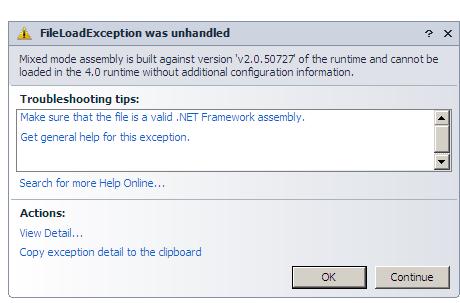
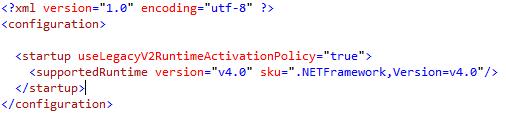
In order to correct the error, an app.config file must be added to the project and then the following code is copied into the configuration file.
 />
/>
TL;DR
The mixed mode assembly error happens when a project references a library built for an older .NET runtime, such as an old MySql.Data build in a WPF 4.0 app. Adding an app.config with useLegacyV2RuntimeActivationPolicy="true" fixes it.
/>
It occurs when an application references a library that was built on a lower version of the .NET framework than the one the application is running on. The author hit it in a WPF 4.0 app that referenced the MySql.Data.MySqlClient library.
Add an app.config file to the project containing a <startup> element with useLegacyV2RuntimeActivationPolicy="true" and a <supportedRuntime version="v4.0" sku=".NETFramework,Version=v4.0"/> entry.